Schedule Triggers
3 min
A schedule trigger initiates a playbook at the configured schedule.
You do not need to select a trigger before adding and configuring actions and conditions.
Schedule Triggers
Create a new playbook or upload an existing playbook, then follow the steps below:
- On the playbook, click Add a trigger.
- Click Schedule.
Example
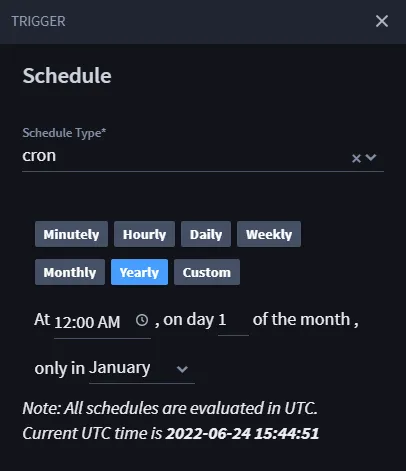
The example below shows a yearly cron job that runs at 12:00 AM on January 1st each year.
- Once the trigger options display, select Schedule.The TRIGGER window displays with the Trigger Type as Schedule and the Schedule Type as cron.
- Select the desired schedule option: Minutely, Hourly, Daily, Weekly, Monthly, Yearly, or Custom.
Depending on the selected schedule, configure the schedule in the fields that display.
- When you are finished, click Save.
You have successfully created a playbook!