Admin Panel Overview
The Admin Panel in Swimlane Turbine provides administrators with a centralized interface for managing the platform's configurations, permissions, and content. It offers several features for setting up roles, users, and integrations with external systems like LDAP and Active Directory.
To access the Admin Panel, click on your profile in the top-right corner and select Admin Panel from the dropdown menu.
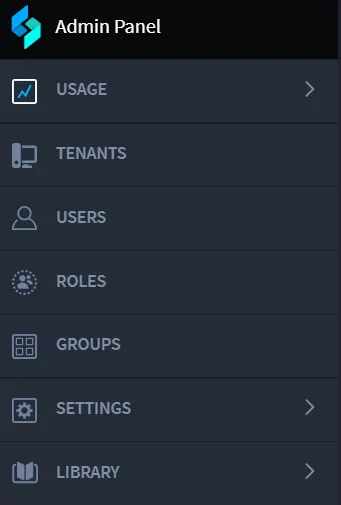
Navigation Menu Overview
The Admin Panel's navigation menu contains the following options:
- Dashboard: View high-level metrics and activity within Swimlane Turbine.
- Tenants: Manage tenant configurations, add or remove tenants, and set tenant-specific settings.
- Users: Add, edit, and manage user accounts, including setting permissions and access controls.
- Roles: Define roles and assign permissions for various objects within Swimlane Turbine, such as applications, records, and dashboards.
- Groups: Create and manage groups of users for easier role and permission management.
- Settings: Configure system settings, security parameters, and external integrations like LDAP and Git.
- Library: Access and manage content libraries, including playbooks and content packages that are shared across tenants.
Dashboard
The Dashboard provides an overview of system activity and performance metrics across all tenants. It includes the following default views:
- Playbook Runs: Displays metrics on the number of playbook runs executed across different tenants. It helps administrators identify trends and performance bottlenecks.
- Hero AI Metrics: Shows usage and performance metrics related to the Hero AI features, such as prompt usage and response times.
- Events Metrics: Analyzes events triggered within the Turbine platform, enabling administrators to identify patterns or potential issues.
Tenants
The Tenants section allows administrators to manage multiple tenants within Swimlane Turbine. Each tenant operates as an isolated environment, which is useful for different teams, business units, or customers. The Tenants page offers the following functionalities:
- Add Tenant: Create a new tenant with specific settings and permissions.
- Edit Tenant: Modify existing tenant configurations and update settings as needed.
- Delete Tenant: Remove a tenant and all associated configurations.
- Search Tenants: Quickly find tenants using the search bar.
Users
The Users section enables administrators to add, remove, and manage users within the Swimlane Turbine platform. User accounts can be created manually or imported from an external directory service like Active Directory.
Administrators can perform the following actions from the Users page:
- Add User: Create a new user and assign them to a specific role or group.
- Edit User: Modify user details, such as email address, role assignments, and permissions.
- Delete User: Remove a user from the system.
- Search Users: Locate users by name, email, or other attributes.
Roles
The Roles section allows administrators to define roles that determine what users can see and do within Swimlane Turbine. Each role has permissions to various objects, such as applications, records, and dashboards. Key functionalities include:
- Add Role: Create a new role and define its permissions.
- Edit Role: Modify the permissions and associated users or groups for an existing role.
- Duplicate Role: Create a copy of an existing role with the same permissions.
- Delete Role: Remove a role from the system.
Groups
Groups are collections of users that share similar permissions. The Groups section enables administrators to organize users more effectively by grouping them based on role or department.
Administrators can perform the following actions:
- Add Group: Create a new group and assign it to a specific role.
- Edit Group: Modify group settings and membership.
- Delete Group: Remove a group and its associated permissions.
- Search Groups: Locate groups by name or description.
Settings
The Settings section provides options for configuring system-wide settings and integrations. These include:
- Directory Services: Integrate with LDAP or Active Directory for user management and authentication.
- Git Integration: Connect to a remote Git repository for content management and version control.
- Security and Compliance: Configure security settings, such as password policies and two-factor authentication (2FA).
Library
The Library section in Swimlane Turbine contains content packages, playbooks, and other reusable components that can be shared across multiple tenants. Administrators can:
- Publish Content: Make a new content package available to all tenants.
- Edit Content: Update existing content packages and synchronize changes.
- Push/Pull with Git: Use the Git integration to manage version control for content packages.
- Delete Content: Remove a content package from the Library.
Note: Only account administrators have access to the Admin Panel. For more information or to request additional access, please contact Swimlane Support.
More Information
For detailed guidance on each feature in the Admin Panel, refer to the individual sections in the Swimlane Turbine documentation or reach out to your Swimlane support representative for further assistance.