History
The History field enables users to view the historical changes of a record. Each time the record is updated, a new version is created and displayed as a new row in the history field's table. This row displays the changes made during that update and allows the user to preview the record at that specific version.
Record versions are created regardless of the presence of a history field in the application. The history field does not store any data; it is only used in the UI to display the record revisions.
From Application Builder's Layout Types, select History and then drag and drop it to the Form Layout. Hover over the History tab in Form Layout and click edit icon or click the History tab to edit the Fields Properties.
When to Use History Layout
Use the History layout when you need to:
- Track all changes made to a record over time
- Provide an audit trail for compliance or security purposes
- Allow users to view previous versions of a record
- See who made specific changes and when
- Review the change history with diff comparisons
Adding a History Field
- In the App Builder, navigate to the Layout section in the left panel
- Click and drag the History layout type (clock icon) onto your form layout
- Configure the field properties (see below)
FIELD PROPERTIES
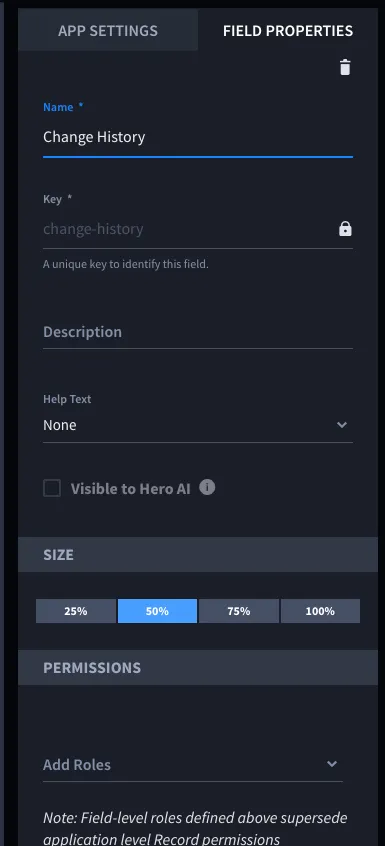
Manage and configure your application's history field settings with the intuitive form layout and field properties interface.
Basic Properties
- Name*: The display name for the history field (for example, "History", "Change History", "Audit Trail")
- Key*: A unique identifier for the field (automatically generated from the name)
- Description: Optional description of the field's purpose
- Help Text: Optional help text that can be displayed above or below the field
- Size: Width of the field (25%, 50%, 75%, or 100%)
Permissions
- Add Roles: Define field-level permissions to control who can view the history field
- Note: Field-level roles supersede application-level Record permissions
Visibility
- Visible to Hero AI: Controls whether the history field is visible to Hero AI
History Field Display
When a History field is added to an application, it displays a table showing:
- Revision: The revision number (clickable link to view that specific revision)
- Last Updated By: The name of the user who made the change
- Last Updated: Timestamp showing when the change was made (displayed in human-readable format)
- Change: A "View Diff" link that appears when changes exist, allowing users to see what changed between revisions
- Comments: (If comment fields exist) Displays comments associated with each revision