Custom and Relative Date Ranges with Time Units
You can use the date picker to filter dashboards and widgets by time. The date picker supports both predefined ranges and custom date input. This article explains how to use each option and provides a reference for creating custom time expressions.
Use Quick Date Ranges
The date picker includes a list of predefined ranges, also known as presets. These options allow you to apply common time filters quickly, without manually entering dates.
When you select a quick range:
- The Start and End fields are filled automatically.
- The date range label updates to reflect your selection.
- The filter is applied when you select Apply.
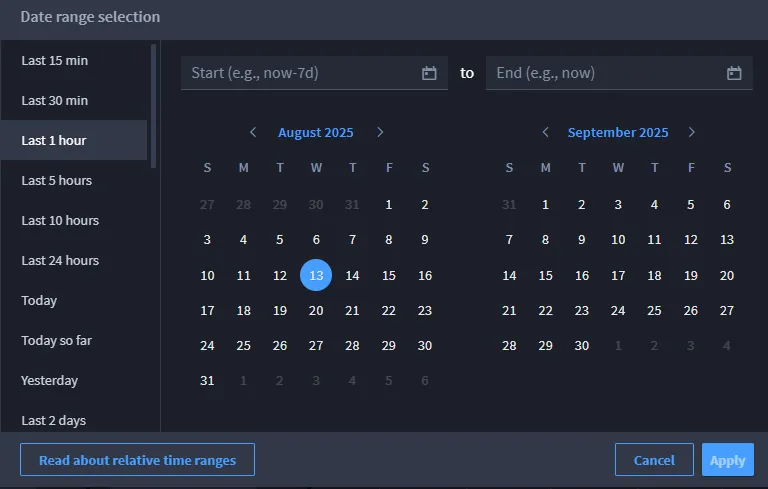
Available Quick Ranges
The following quick ranges are available:
Quick range | Start | End | Start (example) | End (example) |
|---|---|---|---|---|
Last 15 minutes | now-15m | now | 15 minutes ago | Current time |
Last 30 minutes | now-30m | now | 30 minutes ago | Current time |
Last 1 hour | now-1h | now | 1 hour ago | Current time |
Last 5 hours | now-5h | now | 5 hours ago | Current time |
Last 10 hours | now-10h | now | 10 hours ago | Current time |
Last 24 hours | now-24h | now | 24 hours ago | Current time |
Today so far | now/d | now | Today at 12:00 AM | Current time |
Today | now/d | now/d | Today at 12:00 AM | Today at 11:59 PM |
Yesterday | now-1d/d | now-1d/d | Yesterday at 12:00 AM | Yesterday at 11:59 PM |
Last 2 days | now-2d | now | 2 days ago | Current time |
Last 3 days | now-3d | now | 3 days ago | Current time |
Last 7 days | now-7d | now | 7 days ago | Current time |
This week | now/w | now/w | Sunday at 12:00 AM | Saturday at 11:59 PM |
This week so far | now/w | now | Sunday at 12:00 AM | Current time |
Last week | now-1w/w | now-1w/w | Previous Sunday at 12:00 AM | Previous Saturday 11:59 PM |
This month | now/M | now/M | First day of the month | Last day of the month |
This month so far | now/M | now | First day of the month | Current time |
Last month | now-1M/M | now-1M/M | First day of last month | Last day of last month |
This quarter | now/Q | now/Q | First day of the quarter | Last day of the quarter |
This quarter so far | now/Q | now | First day of the quarter | Current time |
Last quarter | now-1Q/Q | now-1Q/Q | First day of last quarter | Last day of last quarter |
This year | now/Y | now/Y | January 1 | December 31 |
This year so far | now/Y | now | January 1 | Current time |
The calendar week starts on Sunday. All ranges are calculated in your local time zone unless otherwise configured.
Use Custom Date Ranges
You can enter custom values in the Start and End fields to define a date range that isn't covered by the quick presets.
Enter a Range Manually
You can select a range in two ways:
- Use the calendar icon to pick specific dates from a calendar view.
- Type a relative time expression (such as now-3d) into the Start and End fields.
Understand Relative Time Expressions
Relative time expressions let you filter data based on the current time. Use the word now as a reference point, followed by a time offset such as -3d (three days ago).
Supported time units:
- m — minutes
- h — hours
- d — days
- w — weeks
- M — months
- Q — quarters
- Y — years
Syntax options
Expression | Result |
|---|---|
now | Current time |
now-7d | 7 days ago |
now+3d | 3 days in the future |
now/M | Start of the current month |
now-1Q/Q | Start of last quarter |
now/Y | Start of the current year |
now-2w to now-1w | A custom range from 2 weeks ago to 1 week ago |
Use / to round to the start of a time unit:
- now/d = start of the day
- now/w = start of the week
- now/M = start of the month
- now/Y = start of the year
Fix invalid Input
If your custom input is invalid:
- An error message appears below the input field.
- The Apply button is disabled.
- You must correct the error before applying the filter.
Examples of invalid input:
- Typing now-three instead of now-3d
- Leaving one of the fields empty
- Entering a start date that is after the end date