Retries
Action retries allow you to automatically retry failed actions based on conditions, time limits, and retry count attempts. When an action fails or doesn't meet success criteria, retries can automatically attempt the action again until specific conditions are met or limits are reached.
Overview
Retries are useful for handling transient failures, network issues, or waiting for external systems to become available. You can configure retries to:
- Retry actions until a success condition is met
- Limit the number of retry attempts
- Add delays between retry attempts
- Set a maximum duration for retry attempts
How Retries Work:
- Retries occur when an action fails AND the retry condition (if expression) evaluates to false
- If the retry condition evaluates to true, the action is considered successful and no retry is needed
- Retries stop when:
- The retry condition becomes true (success)
- The maximum number of attempts (limit) is reached
- The maximum duration (15 minutes) expires
Apply Action Retries
To configure retries for an action:
- Add and configure an action.
- Click the action, then click Configure.
- Configure the action inputs as needed.
- Next to Retry, click the plus icon to expand the section.
- Configure the retry parameters:
- Until: Configure a condition expression that determines when retries should stop. When this condition evaluates to true, the action is considered successful and retries stop. If no condition is set, the action will retry until it succeeds (or until limits are reached).
- Delayed: Set the time to wait before retrying the action. You can specify this in seconds or minutes. For example, 30 seconds or 1 minute.
- Within: Set the maximum number of retry attempts. Once this limit is reached, retries stop and the action fails.
- Click Apply.
Retries automatically timeout after 15 minutes from the first retry attempt. This timeout is fixed and matches the playbook timeout. It cannot be configured separately.
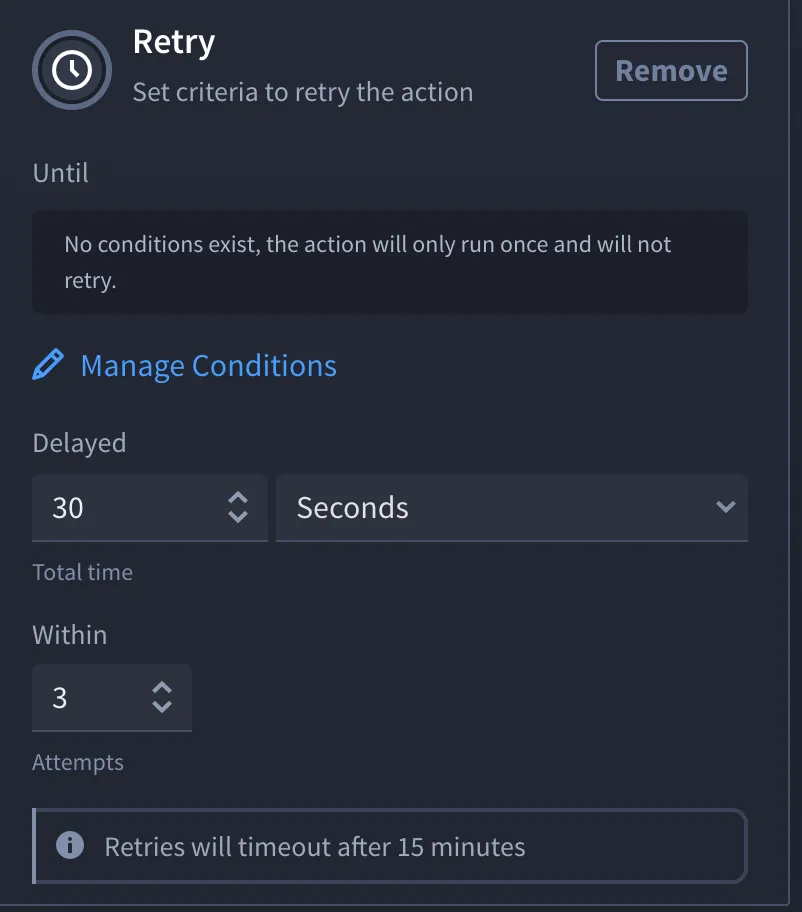
After you configure the retry criteria and click Apply, the action will retry according to your configuration until:
- The retry condition (Until) evaluates to true (success)
- The maximum number of attempts (Within) is reached
- The 15-minute duration expires
Understand Retry Behavior
Retry Condition Logic
The retry condition (Until) works as follows:
- If condition evaluates to true: The action is considered successful, and retries stop immediately
- If condition evaluates to false: The action needs to be retried (if within limits)
- If condition evaluation fails: The action is retried (configuration issue)
Retry Limits
Retries stop when any of these limits are reached:
- Success Condition Met: The Until condition evaluates to true
- Attempt Limit Reached: The number of retries equals the Within limit
- Duration Expired: 15 minutes have passed since the first retry attempt
The first retry attempt counts toward the Within limit. For example, if Within is set to 3, the action will execute up to 3 times total (1 initial attempt + 2 retries).
Retry Timing
- Delay Between Retries: The Delayed parameter determines how long to wait before each retry attempt
- Total Duration: Retries automatically timeout after 15 minutes from the first retry attempt, regardless of the number of attempts
Example Timeline:
- Attempt 1: Action executes (fails)
- Wait: Delayed duration (e.g., 30 seconds)
- Attempt 2: Action retries (fails)
- Wait: Delayed duration
- Attempt 3: Action retries (succeeds or fails)
- Result: Success (if condition met) or failure (if limit reached)
Best Practices
- Set Appropriate Conditions: Use clear, specific conditions in the Until field to determine success. Avoid conditions that might never become true.
- Choose Reasonable Limits: Set the Within limit based on expected failure scenarios. Too few attempts may cause premature failures; too many may waste resources.
- Use Delays Wisely: Add delays between retries to:
- Allow external systems to recover
- Avoid overwhelming APIs with rapid requests
- Give time for transient issues to resolve
- Monitor Retry Behavior: Review playbook run history to understand retry patterns and adjust limits accordingly.
- Handle Retry Failures: Consider adding error handling actions in the On Failure path to handle cases where retries are exhausted.
Troubleshooting
- Action Retries Indefinitely: Check that the Until condition can actually become true. If the condition always evaluates to false, retries will continue until limits are reached.
- Retries Stop Too Early: Verify that the Within limit is not too low, or that the 15-minute duration hasn't expired.
- Condition Evaluation Errors: If the retry condition fails to evaluate (e.g., due to missing properties), the action will retry. Check your condition expression for errors.
- No Retries Occurring: Ensure the action is actually failing. Retries only occur when actions fail AND the retry condition is false.